How the Pieces Fit Together
Before you install anything, it helps to know where each piece runs and how they find each other. There are three ideas, and each builds on the one before.
The picture
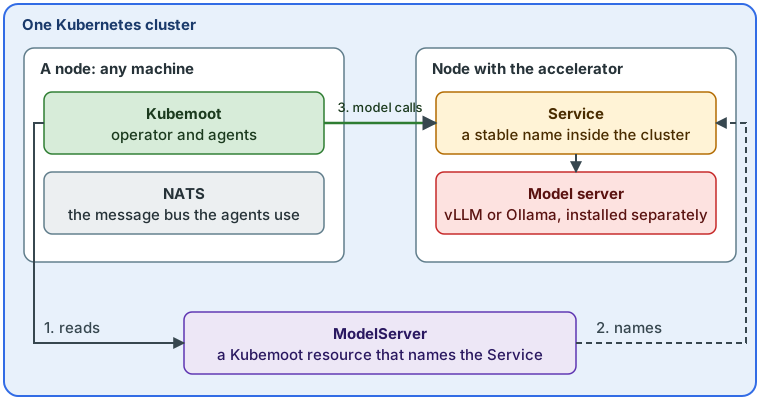
- One cluster holds everything. A Kubernetes cluster is a group of machines that Kubernetes manages as one. Each machine in it is a node, and every node runs workloads that Kubernetes places for you. Your machines are the cluster’s nodes. The machine with the accelerator (a GPU or another device that runs models fast) is a worker node like the others, with the accelerator attached.
- The model server runs on the cluster, on the accelerator node. A model server is the program that loads a model and answers requests for it. vLLM and Ollama are the two Kubemoot works with. Kubemoot does not include one: you install it separately, as a workload on the cluster, and Kubernetes starts it on the node that has the accelerator. A model server on the cluster is reached through a Kubernetes Service, a stable name inside the cluster that stays the same wherever the server’s pod runs.
- Kubemoot runs on the cluster too, and finds the model server through a
ModelServer. A
ModelServeris a Kubemoot resource that names the Service of your model server. Agents look up the ModelServer and send their model calls to the Service it names. Kubemoot does not care which node the model server is on, only that the Service answers.
Nothing here is a connection between two computers that you wire up by hand. Every machine joins the one cluster, and Kubernetes carries traffic between the workloads on it. Kubemoot reaches the model server the same way any other workload reaches a Service.
A Raspberry Pi has no accelerator that a model server can use, so it is never the node
that runs the model. It can join a cluster as a node, but only as a node that runs
other workloads, and Kubemoot itself needs amd64 nodes today (see
Install the Operator). Put the model server on a
machine with an accelerator, or run a small model on the CPU of an amd64 PC.
Example: one PC
The Quickstart puts everything on one machine. The script creates a
single-node cluster with kind, so the PC is the cluster’s only node. Ollama, NATS,
and Kubemoot all run on it, and the ModelServer the script applies names the Service
of that Ollama. The model runs on the CPU, with no accelerator, which is why the models
are small and the answers slow. Everything in the picture above exists, folded onto one
node.
Example: a homelab with several PCs
A homelab has several PCs, some with accelerators. Each PC is a node of one cluster,
and Kubemoot, NATS, and the dashboard run on whichever nodes have room. On the nodes
with accelerators, a vLLM server runs for the models you list, and a ModelServer names
its Service, as Install a model server
shows. The accelerator must reach the node itself, on bare metal or passed through to a
virtual machine; GPU Worker Nodes covers that
setup. With more than one accelerator node, each model server gets its own
ModelServer, and Kubemoot places each call on the server that has the model and the
room, just in time (see Models and Scheduling).
A model server outside the cluster
The model server does not have to run on the cluster. A ModelServer can name an
address that is reachable from the cluster instead of a Service, such as a machine you
lease or a hosted accelerator. Kubemoot cannot measure an accelerator it does not
manage, so you declare the memory it may use with scheduling.memoryMiB:
apiVersion: kubemoot.ai/v1alpha1
kind: ModelServer
metadata:
  name: leased-ollama
spec:
  type: ollama
  endpoint: https://models.example.com:11434
  scheduling:
    memoryMiB: 49152   # accelerator memory the server may spend on models
Without a budget, agents refuse to load a model on that server, because there is nothing to check the model against. The ModelServer reference lists the fields for each engine.
Where to go next
- Quickstart: the one-PC example, running in minutes.
- Install the Operator: the prerequisites and the install, with a model server on an accelerator node.
- Models and Scheduling: how Kubemoot picks a model server for each call.