Fitness from the editor
Fitness functions measure whether a
crew does its job. CrewForge runs them, shows their results, and lets you hold or end a
run, all against the same Kubemoot resources kubectl and kmctl use. Writing the
scenarios themselves is covered in
Define Fitness Functions.
Your scenarios
A crew source keeps its fitness definitions in a fitness/ folder, inside a chart or
beside a bundle. Expand Fitness Scenarios under a source to list them: the scripts of
each CrewFitnessSuite, each CrewFitness, and loose .adl (ADL) and .md (prose) scripts.
- Add Fitness Scenario… asks whether the scenario is ADL or prose, and for a name. It writes the scenario in the folder’s layout: a one-scenario CrewFitnessSuite YAML shaped like the kmctl starter suite, or a loose script when the folder holds those.
- Rename Fitness Scenario… renames one.
- Delete Fitness Scenario… asks first, then moves a script file to the trash, or removes its script from a suite that keeps others.
These three change local files only.
Scenarios on a live crew
A crew made by kmctl create deploys its scenarios in a ConfigMap, so a running crew
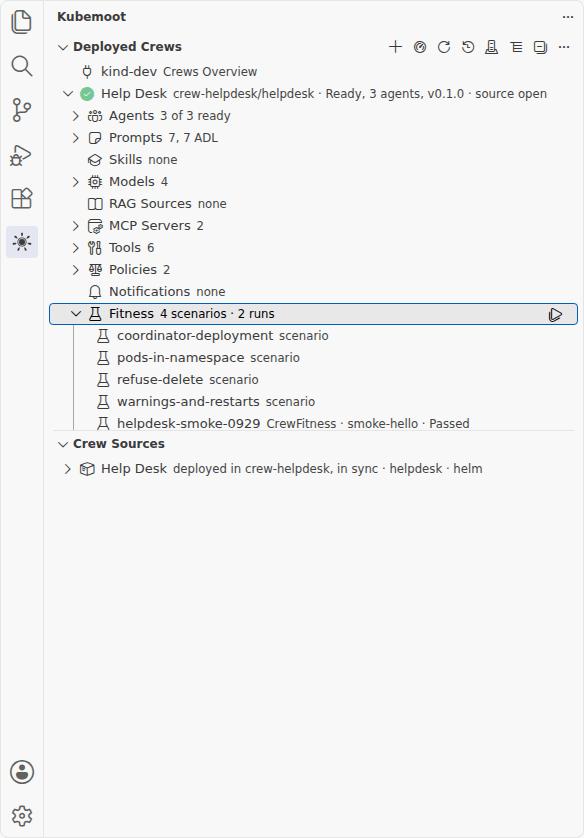
carries them. In Deployed Crews, the crew’s Fitness group lists them with its past
runs, for example 4 scenarios · 2 runs, and adds changed since deploy when an open
source’s scenarios differ. It works with no local source open.
Scenarios come from ConfigMaps labeled kubemoot.ai/crew=<crew> and
kubemoot.ai/fitness-kind=scenarios. A key ending in .yaml holds CrewFitness or
CrewFitnessSuite manifests; a key ending in .adl or .md (other than README.md) holds
one script named after the key. Runs from this group always use the deployed scenarios,
and the tooltips say so.
- Run All Deployed Scenarios runs every scenario once, as a suite named
<crew>-all-<timestamp>. - Run Scenarios… shows every scenario with its DESCRIPTION, all checked. Pick the
ones to keep, then an iteration count: 1, 3, 5, 10, or another number up to 100. It
starts one CrewFitnessSuite named
<crew>-batch-<n>-<timestamp>, or<crew>-all-...when you kept every scenario. - Run This Scenario Only runs one iteration of one scenario.
- Show Scenario Script opens the script.
- Pause, Resume, and Stop appear inline on a run in progress.
Rows can be selected together. Run Selected Scenarios as One Batch runs the selected scenarios as one suite after the iterations prompt. Run Scenarios… and Run Selected Scenarios as One Batch also work in Crew Sources, on a source’s Fitness Scenarios, against its deployment.
Each batch is one CrewFitnessSuite, judged together, with one XLSX. Its fitness dashboard opens on it. CrewForge refuses to start while another run of that crew is in progress and names that run. Selected rows from two crews or two sources are refused, with “CrewForge runs one crew’s batch at a time”. An empty selection is said plainly.
Run a crew’s fitness
Choose Run Fitness on a source, on a deployment, on a deployed crew, in the status
bar menu, or in the crew dashboard. On a live crew that carries deployed scenarios, it
runs those; otherwise CrewForge offers the fitness definitions the source
renders, plus any in its fitness/ folder, and starts a run under a timestamped name so
every run is kept. The run is a Kubemoot resource in the crew’s namespace.
- Run Fitness is hidden, and refuses, while a run of that crew is in progress.
- CrewForge warns before starting a run while a run of another crew is in progress. Crews share GPUs, so two runs at once measure contention, not the crew.
To try one scenario after changing a prompt, choose Run This Scenario Only (the play
icon) on a scenario. It starts one iteration of that scenario against the deployment
that Redeploy goes to, as a CrewFitnessSuite of that one script named
<crew>-<scenario>-<timestamp>, whether the scenario is a suite’s script, a CrewFitness,
or a script file. The run is marked as a single-scenario run, and its Fitness dashboard
opens on it.
After a redeploy, the notification’s Rerun fitness button runs the definition you ran last, without asking.
The fitness dashboard
Click a Fitness node, a run, or Open Fitness Dashboard. The tab reads
<display name> fitness and the heading Fitness: <display name>. A live crew that carries deployed scenarios can run from the
dashboard without a source.
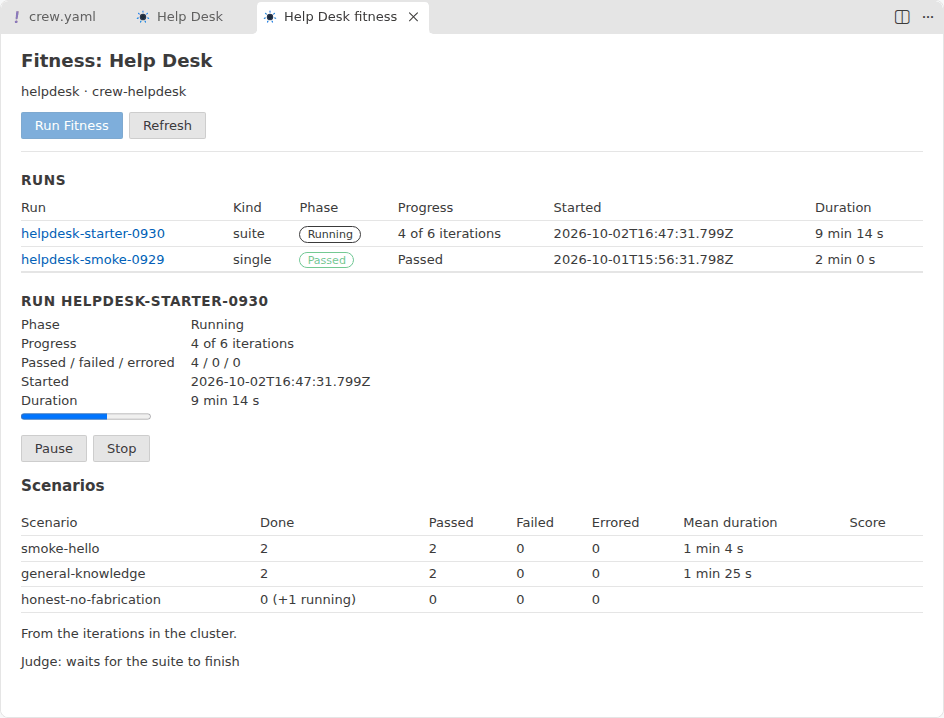
It lists the crew’s runs, newest first, and the selected one in detail:
- the phase, with Pausing and Stopping shown until the operator settles;
- iterations done out of total, and how many passed, failed, and errored;
- start, end, and duration, and the results workbook;
- for a suite, each scenario’s iterations and outcomes with their mean duration and judge score, and where the deferred judge stands;
- for a single run, its assertions.
The page reads again every few seconds while a run is going. Open XLSX downloads the
results workbook from the Kubemoot dashboard when crewforge.dashboardUrl is set.
Pause, resume, and stop
The buttons set fields on the run’s own resource, so they behave exactly as they do from
kubectl. The operator defines the behavior; see
Pause, resume and stop in
the CrewFitnessSuite reference.
| Button | What it sets | What happens |
|---|---|---|
| Pause | spec.suspend: true on the suite | The iteration in flight finishes and its result is kept. No new iteration starts. The phase shows Pausing, then Paused. A paused suite puts no load on the crew, so it is a safe moment to change the crew. |
| Resume | spec.suspend: false | The suite continues at the next iteration it has not run. Completed iterations are not repeated. |
| Stop | spec.cancel: true on the suite | The iteration in flight is deleted and no new one starts. The phase shows Stopping, then Cancelled, and the results so far are kept. A cancelled suite is not judged, and Stop cannot be undone. |
| Stop on a single-scenario run | Deletes the CrewFitness | The run goes away. See Stopping a single CrewFitness. |
Stop asks for confirmation first. The buttons appear only while they apply: Pause on a
running suite, Resume on a paused one, Stop on a suite that is pending, running, or
paused. They also appear only when your operator’s CRD has spec.suspend and
spec.cancel; an older operator shows no buttons, and CrewForge needs patch on
crewfitnesssuites (and delete on crewfitnesses for a single run) to use them.
Next
- Fitness functions: how the scenarios work and what they assert.
- CrewFitnessSuite: the resource’s fields, phases, and the full behavior of pause, resume, and stop.