CrewForge
The VS Code extension for developing Kubemoot crews: create, edit, lint, deploy, ask, and test from the editor.
CrewForge is a VS Code extension for building and running Kubemoot crews without
leaving the editor. You scaffold a crew, edit it as code, deploy it to a namespace with
Helm, ask it questions, run its fitness scenarios, and see how the running crew differs
from your source.
It works through your kubeconfig, the same way kmctl does: the chat
reaches a crew’s discussion gateway through the Kubernetes API server’s service proxy,
so no crew needs a public address and no extra credential is involved. CrewForge writes
only Kubemoot resources and Helm releases of them. The operator owns cleanup.
A 60-second tour
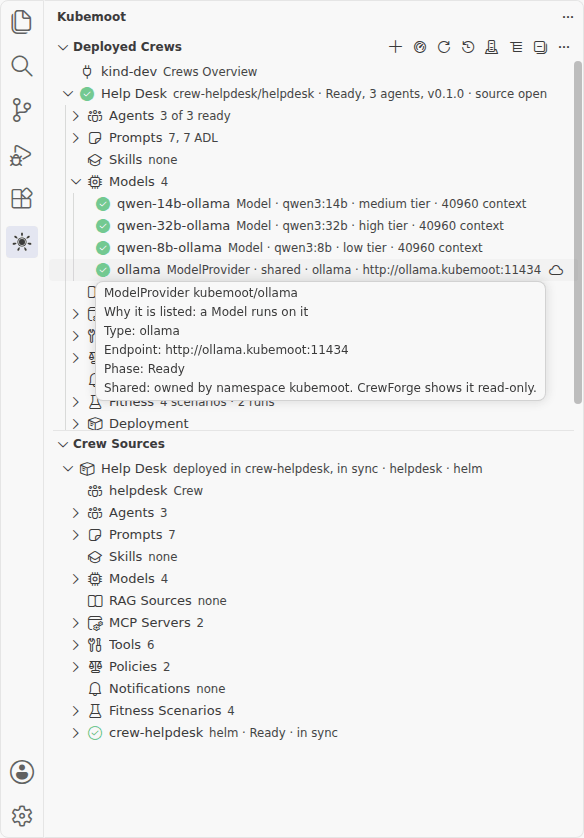
- Click the Kubemoot mark in the activity bar. Deployed Crews lists the crews your
kubeconfig can read, grouped by namespace. Crew Sources lists the crews in your
workspace.
- Click a crew, deployed or in your workspace, to open its dashboard: an overview, the
source it renders, its live objects, and the diff between the two.
- Choose Ask on a deployed crew to open a chat. Type a question and press Enter;
each agent reports as it works, then the crew’s answer follows.
- Right-click a folder in the Explorer and choose New Kubemoot Crew Here to
scaffold a crew, then Deploy to Namespace… to run it.
Where to go next
- Install and connect : Install the CrewForge extension, point it at a cluster, and what it shows when the cluster cannot be reached.
- Develop a crew in VS Code : The inner loop, step by step: create, understand, edit, lint, deploy, ask, debug, redeploy, and retest a crew from the editor.
- Views and dashboards : Reference for every CrewForge view, dashboard tab, chat control, and action: when to use it and what it changes on the cluster.
- Fitness from the editor : Run a crew's fitness scenarios from VS Code, run a single scenario, and pause, resume, or stop a run.
- Settings and permissions : Every CrewForge setting, and the cluster permissions each feature needs.
- Troubleshooting : Fix a page stuck on Reading, an unreachable cluster, a missing kmctl or helm, a schema mismatch, and find CrewForge's logs.
For the end-to-end workflow, start with
Develop a crew in VS Code. To install the extension, start with
Install and connect.
Status
CrewForge installs from the .vsix attached to each
GitHub release. Listings in the
Visual Studio Marketplace and Open VSX are coming. It needs VS Code 1.95 or later.
Related pages
- kmctl: the command-line counterpart, and the tool CrewForge calls to
scaffold a crew.
- Build a Crew: the resource-level workflow the
editor workflow wraps.
- Define Fitness Functions: write the
scenarios Run Fitness executes.
- Installation: install the operator CrewForge
talks to.
Install the CrewForge extension, point it at a cluster, and what it shows when the cluster cannot be reached.
The inner loop, step by step: create, understand, edit, lint, deploy, ask, debug, redeploy, and retest a crew from the editor.
Reference for every CrewForge view, dashboard tab, chat control, and action: when to use it and what it changes on the cluster.
Run a crew’s fitness scenarios from VS Code, run a single scenario, and pause, resume, or stop a run.
Every CrewForge setting, and the cluster permissions each feature needs.
Fix a page stuck on Reading, an unreachable cluster, a missing kmctl or helm, a schema mismatch, and find CrewForge’s logs.